
Microsoft has released a substantial update for Windows 11, with the February 2026 patch bringing latest features and improvements to both the 24H2 and 25H2 versions of the operating system. The update, designated KB5077181, advances the system to build 26200.7840 (and 26100.7840 for 24H2). Microsoft is also offering offline installers in .MSU format for users who prefer a manual installation process.
What’s New in the February Patch
Microsoft maintains both 24H2 and 25H2 on the same platform, meaning the changelog is largely parallel. The difference lies in the timing of feature rollouts. Neowin reports the patch is identified as “2026-02 Security Update (KB5077181) (26200.7840)” and is mandatory unless Windows Update is paused.
Direct Download: Offline Installers (.MSU)
This month, Microsoft has provided a convenience for administrators and users who have experienced issues with Windows Update: the ability to download the update from the Microsoft Update Catalog and run the .MSU file manually. This is particularly useful for environments without internet access, or for controlled deployments.
AI Models Included in the Update
The significant size of the update – exceeding 4 GB – is due to the inclusion of local AI models, specifically Phi, within the monthly updates. Microsoft assures users that these models will not be applied on devices lacking an NPU with 40+ TOPS (Tera Operations Per Second), the dedicated neural processing unit found in Copilot+ PCs.
TOPS measures inference performance and Microsoft will not force AI features on systems without the necessary hardware.
Size Reference:
- 25H2 x64 (26200.7840): 4170,5 MB
- 25H2 arm64 (26200.7840): 3853,1 MB
- 24H2 x64 (26100.7840): 4170,5 MB
- 24H2 arm64 (26100.7840): 3825,1 MB
Notable Improvements for Users
1) Cross-Device Resume: Seamless Continuity
The update introduces Cross-Device Resume, allowing users to seamlessly continue tasks started on their mobile devices on their PCs via the taskbar. Previously limited to OneDrive integration, this feature now extends to apps like Spotify and productivity suites (Word/PowerPoint/Excel), as well as compatible web browsers.
2) Windows MIDI Services: A Modern Foundation for Music
Another significant, though less publicized, update is Windows MIDI Services, a new engine designed to improve communication between music applications and MIDI devices, with enhanced support for both MIDI 1.0 and MIDI 2.0 standards.
3) Smart App Control: Enhanced Security
Smart App Control (SAC) blocks untrusted applications. Previously, enabling or disabling SAC required a clean installation. With KB5077181, users can now change SAC settings directly from Windows Security without reinstalling the operating system, though the rollout is gradual.
4) Updated Start Menu and Battery Icons
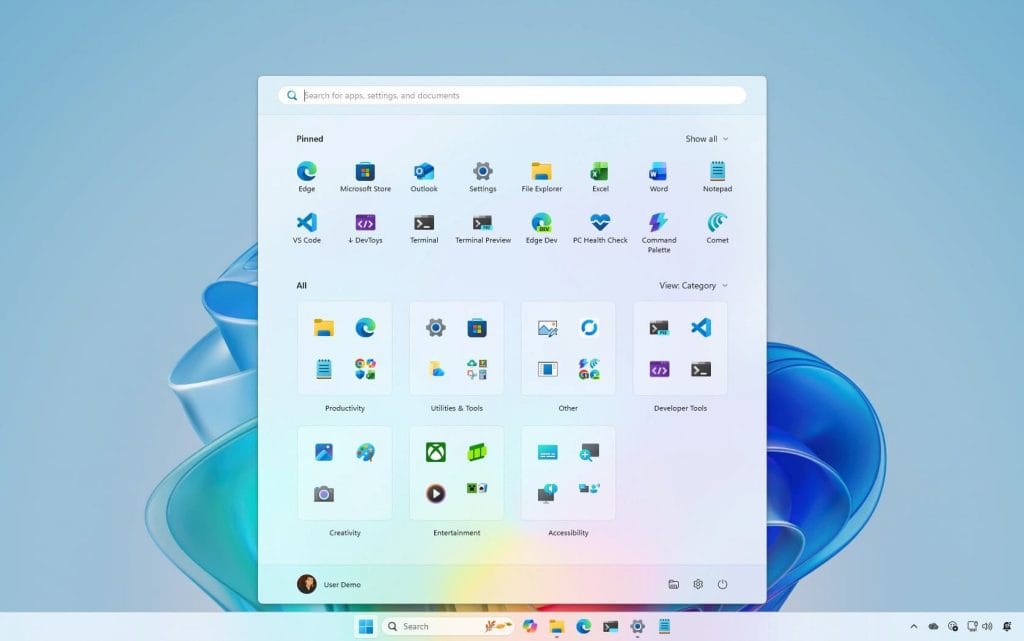
Microsoft continues to roll out the redesigned Start Menu (larger, single-page layout with improved app access) and updated battery icons. The deployment is ongoing, and users may not spot the changes immediately.
KB5077181 represents the current direction of Windows 11, where security and new features are delivered together, even if it means larger downloads and phased rollouts.
With features like Cross-Device Resume, the continued rollout of the new Start Menu, and improvements to Smart App Control, Microsoft is refining the user experience to create a more cohesive and user-friendly operating system.
