
Samsung is expanding the availability of its inactivity restart feature, a security measure designed to automatically reboot devices after a period of non-use. The feature, initially introduced with One UI 8, is now rolling out to newer Galaxy devices, including the recently announced Galaxy S26, Galaxy S26+ and Galaxy S26 Ultra.
More Security for Galaxy Devices
The rollout extends beyond the newest flagships, with the feature already available on the Galaxy S25 series. This expanded availability underscores Samsung’s commitment to bolstering device security across its product line. The feature is part of a broader trend of manufacturers adding automated security measures to protect user data.
The inactivity restart function enhances security by automatically rebooting a Galaxy device after 72 hours of inactivity while locked. This ensures that pending security updates, such as those from Google Play System or other patches, are installed. This proactive approach to security helps mitigate potential vulnerabilities and keeps devices protected.
Beyond security updates, the feature also provides a layer of protection against unauthorized access. If a device is lost or stolen, the reboot process requires a PIN, password, or biometric authentication before full functionality is restored. This prevents immediate access to data and adds a crucial security barrier.
The feature originated with Google, which introduced it last year, and is now being deployed to a wider range of devices, including the new Galaxy S26 series, likely through the February system update of Google Play services.
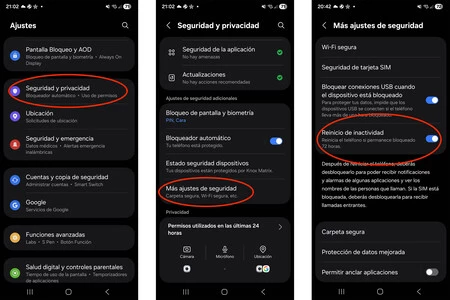
To verify the feature is available on your Galaxy device and to enable it, navigate to the Settings menu. From there, select Security and privacy, then More security settings, and finally, Activity restart to toggle the function on.
Images | Samsung
In Xataka Móvil | Ni es ni una novedad de One UI ni está escondida en los ajustes pero para mí es una de las funciones más prácticas de mi Galaxy
In Xataka Móvil | De la Pantalla de Privacidad del Galaxy S26 Ultra nos faltaba por saber cómo funciona. Samsung ya lo ha desvelado
