
Office Account > Update Options > Disable Updates.Put a reminder on your calendar for February 11th to re-enable updates. Or, check back on this Known Issue in case it is addressed sooner.
Last Updated: November 6, 2024ISSUEWhen you try to create a new signature linked to your own account (cloud signatures), you notice that the newly created signature gets deleted after a while or you may find that the signature does not sync up with Outlook Web App (OWA).Outlook Desktop added roaming signatures starting in Version 2303 and higher. For more information, please go to Outlook roaming signatures.STATUS: FIXEDThe Outlook Team fixed the root cause issue that was preventing signature sync. Initially the fix is available in the Beta Channel and Current Channel Preview with Version 2411 (Build 18205.15010). The fix is being backported to production channels in the November 12, 2024, public updates. The fix is available in the following builds: Beta Channel: Version 2411 (Build 18205.15010) Current Channel Preview: Version 2411 (Build 18205.15010) Current Chanel: Version 2410 (Build 18129.20124) – November 12, 2024 public update Monthly Enterprise Channel: Version 2409 (Build 18025.20188) – November 12, 2024 public update Monthly Enterprise Channel: Version 2408 (Build 17928.20272) – November 12, 2024 public update Semi-Annual Enterprise Channel (Preview) – Version 2408 (Build 17928.20272) – November 12, 2024 public update Semi-Annual Enterprise Channel: Version 2402 (Build 17328.20636) – November 12, 2024 public updateWORKAROUNDAccount data related to Cloud Settings is cached under the Settings key. You can try working around the issue by renaming the Settings key. Support has found this step to work in some recent cases. Open Regedit.In Regedit, navigate to path.ComputerHKEY_CURRENT_USERSoftwareMicrosoftOfficeOutlookSettingsIn Regedit, right-click the Settings key, select Rename, then rename the Settings key to Settings_old.Restart Outlook.Due to an older issue that has since been fixed, account-related data may be incorrectly cached within that registry value. The fix did not retroactively fix cases of this so its possible accounts five years or older might see it. The bug would cause any newly created signature to fail to sync to the cloud. After the (failed) sync, Outlook checks to see if the signatures that we have on the PC match the list of signatures in the roaming_signature_list. Because the new signature does not appear in the list shortly after a sync up, Outlook deletes it.Additional ResourcesOutlook roaming signaturesOutlook roaming optionsInformation about Store my Outlook settings in the cloud
You may find that when you are opening files, they open as read-only. Read-only means you can only view or print. In some cases, this is for added security, such as when you are opening files from the internet, and other times, it can be due to a setting that can be changed. Here are some scenarios where a file opens read-only and some steps you can take to change that.My antivirus is causing files to open read-onlySome antivirus programs may protect you from potentially unsafe files by opening them read-only. You may need to check with your antivirus provider to learn how to adjust these settings. BitDefender, for example, has content on adding application exclusions here: How to add application or process exclusions in Bitdefender Control Center.Are the file properties set to read-only?You can check the file properties by right-clicking on the file and choosing Properties. If the Read-only attribute is checked, you can uncheck it and click OK.The content opens in Protected ViewFiles from the Internet and from other potentially unsafe locations can contain viruses, worms, or other kinds of malware that can harm your computer. This is also commonly the case with email attachments or files you’ve downloaded. To help protect your computer, files from these potentially unsafe locations are opened in Protected View. By using Protected View, you can read a file and see its contents while reducing the risks. For more information on Protected View and how to change settings, see this article: What is Protected View?Is OneDrive full?If the file is stored on OneDrive and your OneDrive storage space is
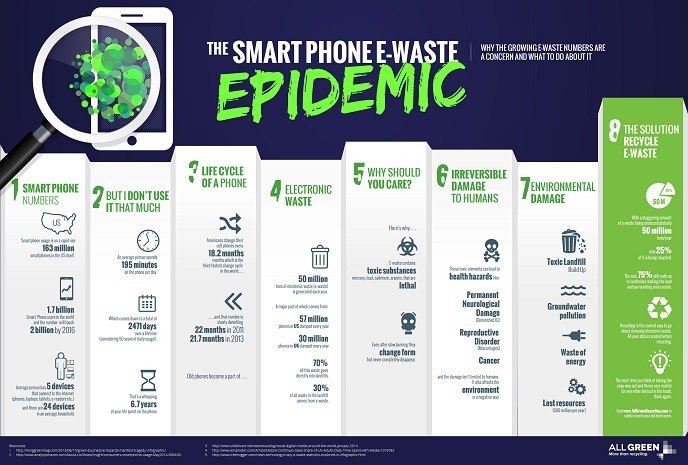
EPA Finds Security Features Contribute to Rising Smartphone E-Waste
16

previous post