
YouTube has introduced a recent Gemini-powered feature that allows users to request questions about videos they’re watching directly within the app or on the web. The tool, marked by a Gemini icon located below the video player between the Share and Download buttons, is currently available on select English-language videos across Android, iPhone, and desktop platforms.
To use the feature, users simply need to open the YouTube app on their iPhone or iPad, or visit the YouTube website on a computer, start playing a video, and then tap or click the Gemini icon. This opens an interface where they can either choose from suggested prompts or type their own question into the search bar to get information related to the video content.
According to Google’s support documentation, the Gemini integration enables users to search for and learn about YouTube videos, playlists, and channels using public information from the platform. For example, a user could ask Gemini to find videos on a specific topic and then request a summary of the first result.
The feature is designed to help viewers better understand and explore video content in real time without leaving the YouTube interface. However, Google notes certain limitations: the tool cannot display a full list of a user’s watch history, liked videos, saved playlists, or subscribed channels, nor can it perform actions that alter the YouTube experience such as saving videos to playlists or posting comments.
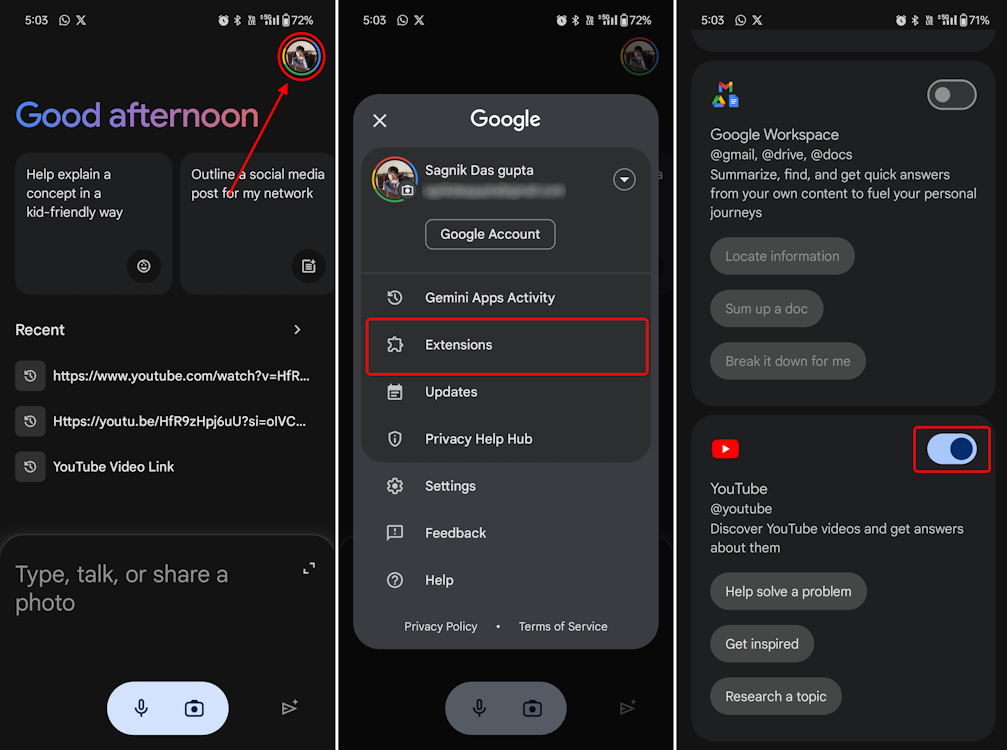
the Gemini YouTube integration is not available during live chats or within Google Messages. Users must be signed into the Gemini app and have activity tracking enabled for the feature to function properly.
This update reflects Google’s broader strategy of embedding its AI capabilities across consumer products to enhance user interaction with digital content. By combining YouTube’s vast video library with Gemini’s natural language processing, the company aims to make information discovery more intuitive, and conversational.
