
MSI is targeting the value-conscious gaming market with it’s new MAG Infinite E1 14NVL5-244JP desktop, pairing an Intel Core i5 processor with the recently released NVIDIA GeForce RTX 5060 graphics card. The pre-built PC aims to deliver a strong 1080p gaming experience without a premium price tag, a key consideration for consumers amid fluctuating component costs. Headlinez.news put the system through a rigorous testing process to determine if it lives up to its promise of delivering a compelling balance of performance and affordability.
MSI is targeting budget-conscious gamers with its new MAG Infinite E1 14NVL5-244JP desktop PC, offering a compelling combination of performance and price. The pre-built system aims to deliver a strong gaming experience without breaking the bank, a key consideration as PC component costs fluctuate.
The configuration pairs an Intel Core i5-14400F processor with an NVIDIA GeForce RTX 5060 graphics card, backed by 32GB of DDR5 memory and a 1TB NVMe SSD. As of this writing, the system is priced at ¥154,000, representing a significant value given recent increases in memory pricing.
But does this affordable price point translate into a satisfying experience for entry-level and casual gamers? We put the MAG Infinite E1 14NVL5-244JP through its paces, evaluating its features and gaming performance to determine if it truly delivers on its value proposition.
High-Quality, High-Frame-Rate Gaming at 1080pThe MAG Infinite E1 14NVL5-244JP Offers Exceptional Value
Table of Contents
Let’s dive into the gaming performance of the MAG Infinite E1 14NVL5-244JP.
We tested the system with four popular titles: VALORANT, Apex Legends, Fortnite, and Cyberpunk 2077. While benchmarks for the GeForce RTX 5060 are widely available, our focus was on determining achievable graphics settings at 1080p resolution with a target frame rate of 120fps.
VALORANT: Smooth Performance at Maximum Settings
We began testing with VALORANT, a competitive first-person shooter known for its high frame rates. With no built-in graphics presets, we maximized all available quality settings to “High.”

VALORANT
Using the practice range map, we observed frame rates between 300 and 600fps, averaging around 400fps. While performance in actual matches may be slightly lower due to increased load, the system easily exceeded 120fps, making it well-suited for 1080p gaming. This level of headroom also opens the door to pairing the system with high-refresh-rate gaming monitors or exploring 1440p resolution.
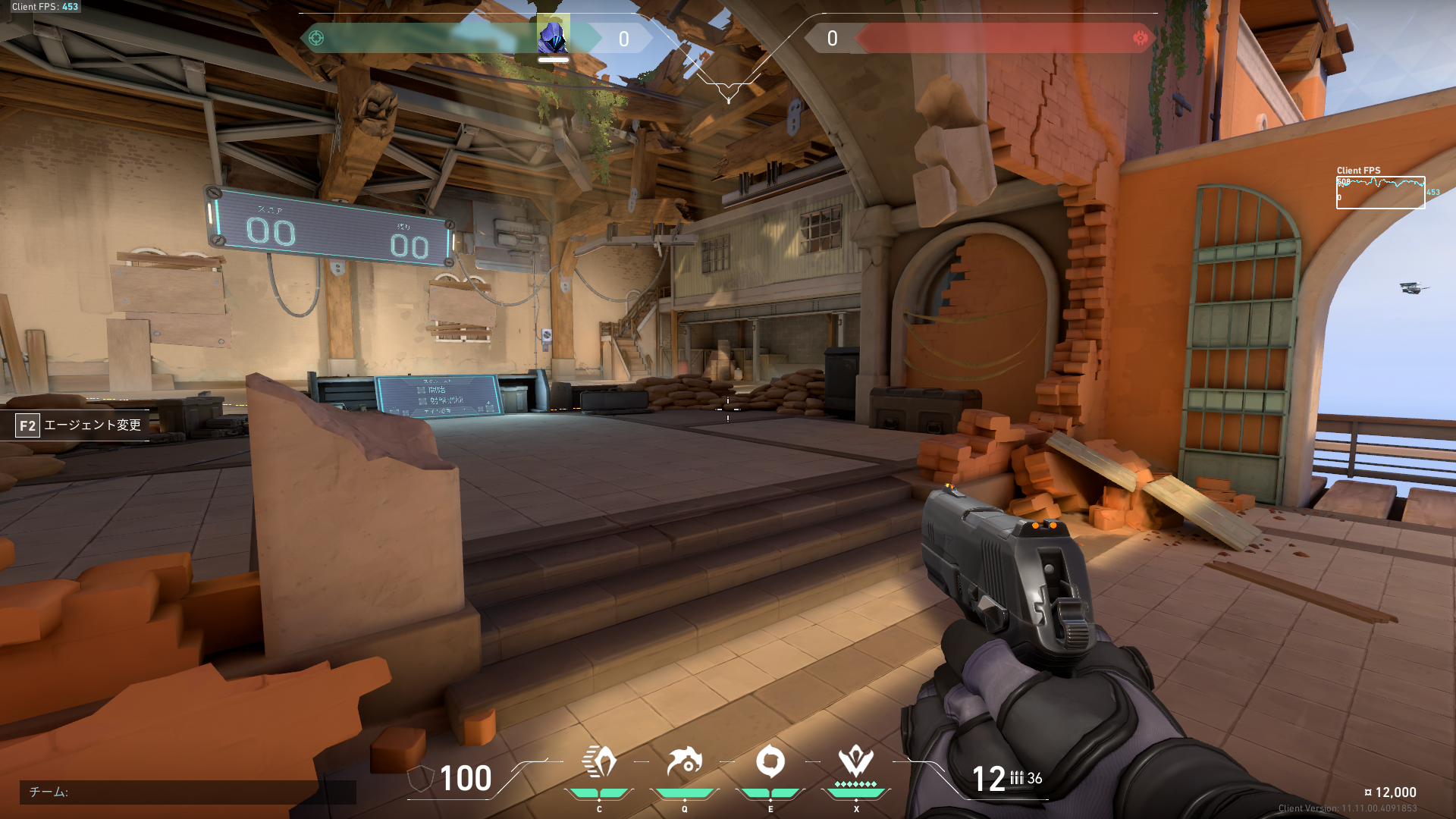
Frame rates consistently hovered between 300 and 600, with an average of around 400fps.

Graphics settings
Apex Legends: High-Quality Gaming with Ease
Apex Legends, another popular competitive shooter, also runs well on this hardware. As with VALORANT, the game lacks traditional graphics presets, so we maximized settings and tested performance in the shooting range.

Apex Legends
Frame rates averaged between 200 and 230fps at near-maximum settings. While the practice range offers a lighter load than a full match, the system should easily exceed 120fps at 1080p with maximum settings during gameplay.
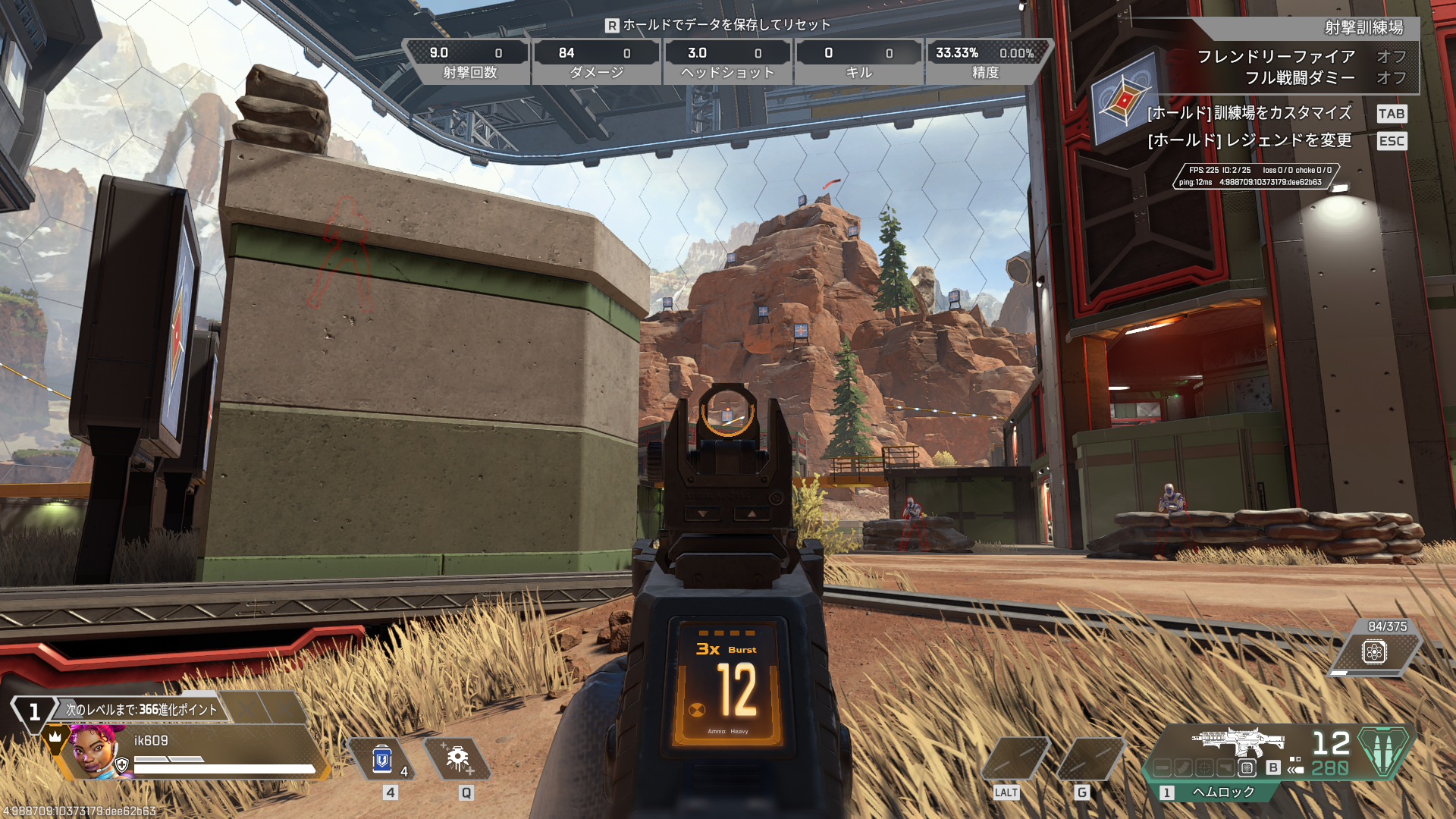
Full HD/maximum settings should deliver frame rates around 200fps.

Graphics settings
Fortnite: Medium Settings for a Smooth 120fps Experience
Fortnite remains a popular title, but it’s more demanding than VALORANT or Apex Legends. We focused on finding the optimal balance between frame rate and visual quality. We tested performance during a battle royale match.

Fortnite
Fortnite offers four graphics presets: “Epic,” “High,” “Medium,” and “Low.” We tested each preset. Achieving a consistent 120fps at maximum settings proved challenging. While the “High” preset often exceeded 120fps, frame rate drops occurred, making it less ideal for a consistently smooth experience. The “Medium” preset maintained frame rates around 110-120fps, providing a stable and enjoyable gaming experience.

The “Medium” graphics preset delivers a stable 120fps experience.

Graphics settings
Cyberpunk 2077: Surprisingly Good Performance Without Ray Tracing

Cyberpunk 2077
Finally, we tested Cyberpunk 2077, a graphically demanding title. We used the game’s built-in benchmark mode to assess performance.

Full HD gaming at maximum settings is achievable without ray tracing.

Benchmark results and graphics settings
With ray tracing disabled, we achieved an average of 124fps at the “Ultra” quality setting at 1080p. Cyberpunk 2077, once notoriously demanding, is now playable on more affordable hardware.

With ray tracing enabled, DLSS Multi Frame Generation 2X is recommended.

Benchmark results and graphics settings
Enabling ray tracing required the use of NVIDIA’s DLSS Multi Frame Generation technology to maintain playable frame rates. With DLSS 2X enabled, we achieved an average of 135.89fps at the “Medium” ray tracing setting.

DLSS Multi Frame Generation 4X allows for “Ultra” ray tracing settings.

Benchmark results and graphics settings
Using DLSS 4X, we were able to push the settings to “Ultra” ray tracing, achieving an average of 214.61fps. While the minimum frame rate dipped to around 30fps, the system delivered a playable experience. For consistently high frame rates at 1080p, we recommend disabling ray tracing and using the “Ultra” preset, or enabling ray tracing with DLSS and targeting the “Medium” or “Ultra” settings.
CPU Temperatures Remain Stable
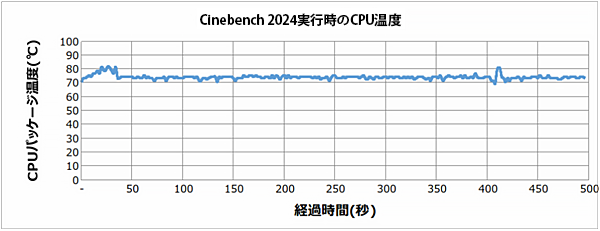
The MAG Infinite E1 14NVL5-244JP features a relatively compact CPU cooler. We tested the cooler’s performance under sustained load using Cinebench 2024 to ensure thermal throttling didn’t occur.
During the Cinebench 2024 test, the CPU reached a maximum temperature of 82°C without thermal throttling. The system’s internal airflow appears to be well-designed, providing sufficient cooling. This ensures consistent performance during extended gaming sessions.
PC Settings and Status Management with “MSI Center”AI-Powered Optimization is Also Available
The MSI MAG Infinite E1 14NVL5-244JP’s settings and operation can be managed through the “MSI Center” utility.
A standout feature is “MSI AI Engine,” which automatically optimizes PC performance, lighting, and fan modes based on the application in use. For example, during gaming, the CPU and GPU are prioritized for maximum performance, while the cooling system focuses on maximizing cooling efficiency. During video conferencing, the system automatically switches to a quiet mode. This simplifies system optimization for users of all technical levels.

MSI AI Engine allows for easy configuration of automatic switching between application-specific modes.
Beyond automatic switching, users can also manually adjust operating modes and create custom profiles. While performance is often prioritized for gaming, quieter operation may be preferable for longer gaming sessions. The ability to customize settings to individual preferences is a significant benefit. We observed a noticeable reduction in fan noise when running the system in silent mode during benchmark testing. The flexibility to choose what’s most important is a key advantage.
The utility also provides real-time PC status monitoring, automatic device driver updates, and control over case illumination.

Real-time PC status can be monitored.

Operating modes can be manually switched, with options for preset selections and custom configurations.

Case illumination can also be controlled through MSI Center.

The selected operating mode and color are reflected in the case’s front illumination.
A High-Value Gaming PC for 1080p, High-Quality GamingA Companion That You Can Rely On for Years to Come

The MSI MAG Infinite E1 14NVL5-244JP delivers excellent value for its price, combining an Intel Core i5 14400F processor and GeForce RTX 5060 graphics card. It offers performance capable of handling both entry-level and mid-range gaming at 1080p.
The system supports NVIDIA’s latest upscaling and frame generation technologies, which can significantly improve performance in demanding titles. With 10 cores, 32GB of memory, and a 1TB SSD, this configuration is well-rounded and provides a solid foundation for years of gaming.
The primary drawback is current availability. The MAG Infinite E1 14NVL5-244JP is currently experiencing limited stock. While variations of the configuration are available, the high value of the MAG Infinite E1 series has led to widespread shortages. Given its attractive price and performance, we hope to see improved availability soon.
