
Pokémon fans have a new way to bolster their in-game collections: simply by tuning into official livestreams on Twitch. the Pokémon Company is increasingly utilizing “Twitch Drops” to reward viewers with exclusive items and bonuses across popular titles like Pokémon GO and Pokémon TCG Pocket. This guide details how players can easily link their accounts and claim these free rewards, offering a streamlined process for dedicated fans.
Pokémon fans can now earn free in-game rewards simply by watching livestreams on Twitch. The Pokémon Company is regularly hosting “Twitch Drops” events, offering players a chance to unlock exclusive items and bonuses for participating in official broadcasts.
These promotions extend across a growing number of Pokémon titles, including Pokémon GO, Pokémon TCG Pocket, and future releases, providing a low-effort way for players to enhance their gaming experience.
Here’s a step-by-step guide to claiming your Twitch Drops, designed to be straightforward for players of all technical skill levels.
Why Participate in Pokémon Twitch Drops?
Table of Contents
The Pokémon Company has significantly increased the frequency of Twitch Drops events in recent years for several key reasons:
- Drive Engagement with Official Streams
- Boost Community Interaction
- Offer Rewards at Minimal Cost
Rewards vary depending on the specific event, but commonly include:
- Exclusive card packs for Pokémon TCG Pocket
- Item codes for Pokémon GO
- In-game bonuses for mainline Pokémon games
- Unique virtual items
The process is remarkably simple, often requiring only that you have a livestream running in the background. This accessibility makes it an attractive option for dedicated fans.
Step 1: Link Your Pokémon and Twitch Accounts
To successfully receive Twitch Drops, you’ll first need to connect your Pokémon and Twitch accounts.
Visit the Pokémon Rewards Page
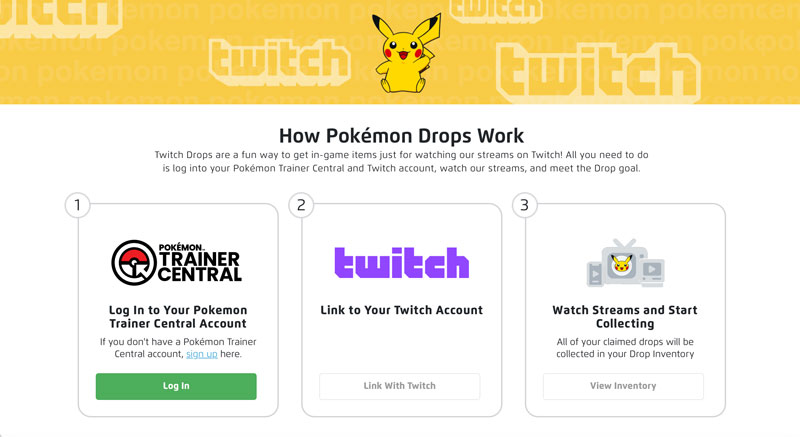
👉 https://rewards.pokemon.com/
You will need:
- A Pokémon Trainer Club account
- A Twitch account
Log in to both accounts on the rewards page and follow the on-screen instructions to link them.
Important Notes
- The initial connection will prompt an authorization window – be sure to click “Allow.”
- Using a computer is recommended for clarity, but the process can also be completed on a mobile device.
- If you’re using an international Pokémon Trainer Club account, ensure your information is consistent to avoid verification issues.
Step 2: Watch Eligible Pokémon Streams on Twitch
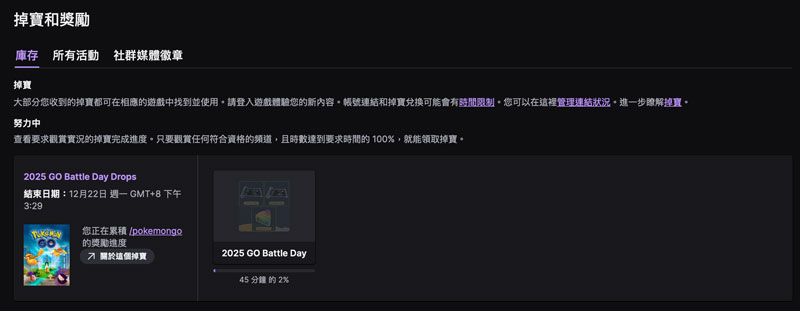
Once your accounts are linked, you can wait for or participate in active events.
Each event will specify the requirements on the Rewards page, including:
- The Twitch channels to watch
- The event’s time window
- The required viewing duration (typically 30–45 minutes)
How to Confirm You’ve Received a Drop
After meeting the viewing requirements, you should see a notification in the upper-right corner of Twitch stating:
“You have earned a drop”
If you don’t see a notification:
- Ensure you are logged in to Twitch.
- Make sure you’re not using incognito mode.
- Verify that Drops are enabled in your Twitch settings.
- Avoid using platforms that don’t support background playback (like some TV apps).
Step 3: Claim Your Reward Code on the Rewards Page!
After watching the stream, allow a few minutes for the system to synchronize, then:
- Return to the Rewards page.
- Click “View Inventory.”
- Your unique code will be displayed.
Simply copy the code and redeem it in the designated Pokémon game to receive your reward!
Which Pokémon Games Support Twitch Drop Codes?
Depending on the event announcement, Twitch Drops rewards may include:
- Pokémon TCG Pocket – Card pack/item exchange codes
- Pokémon GO – Item or cosmetic codes
- In-game bonuses for Pokémon Legends: ZA
- Pokémon Sleep/Pokémon Unite (as announced by the company)
Event details can vary, so it’s best to check official announcements or stay updated on PokémonHubs. This strategy exemplifies how game developers are leveraging livestreaming platforms to engage their communities and offer incentives.
It’s incredibly easy:
- Link your Pokémon + Twitch accounts
- Watch eligible streams for 30–45 minutes
- Return to Rewards to claim your code and redeem it in-game
No purchases are required, no grinding is necessary – just time spent watching streams for rewards. It’s a “lazy player’s” perk that Pokémon fans shouldn’t miss.
