

Apple Watch’s watchOS 26 Now Features Proactive ‘Hints’ to Boost Smart Stack Usage
Apple Watch users received a new update last month with the launch of watchOS 26, and a key feature is now rolling out to improve discoverability of the Smart Stack: proactive “hints” appearing directly on watch faces.
The Smart Stack, accessible by scrolling the Digital Crown on the watch face, offers a collection of widgets. Apple has been refining the Smart Stack over the past two years, most recently adding Live Activity support. watchOS 26 builds on this by using improved prediction algorithms incorporating contextual data, sensor information, and user routines to suggest relevant actions. These suggestions appear as “Smart Stack hints” – subtle visual prompts made of Liquid Glass – at the bottom of the watch face.
For example, a hint for the Backtrack app might appear when a user is in a remote area with limited connectivity, or a Pilates workout suggestion could surface upon arrival at a studio during a typical workout time. Tapping a hint automatically opens the Smart Stack with the suggested widget highlighted. This update aims to address a core challenge with the Smart Stack: users need to actively access it to benefit from its features. Increased engagement with the Smart Stack could lead to greater utilization of Apple Watch’s capabilities and third-party apps.
Apple knows that users spend the vast majority of their time looking at the watch face, making it the ideal location to surface these timely suggestions. For more information on maximizing your Apple Watch experience, visit Apple’s official support page. The company is also offering deals on accessories; you can find current promotions at MacRumors.
Apple officials stated they will continue to monitor user feedback and refine the hint system to ensure it enhances, rather than detracts from, the watch face experience.
watchOS 26 launched last month as a major Apple Watch update. It brought a new Apple Notes app, Apple Intelligence features, Control Center upgrades, and more. One new feature is especially unique: ‘hints’ have been added to watch faces in watchOS 26 as a companion of the Smart Stack.
Hints in watchOS 26 solve the Smart Stack’s discoverability problem
In the last two years, Apple launched the Smart Stack in watchOS and has been progressively upgrading it each year.
The Smart Stack is the stack of widgets you see when scrolling the Digital Crown while viewing your watch face.
Last year’s big upgrade was Live Activity support, which made the Smart Stack more timely and relevant.
In watchOS 26, Apple has improved the Smart Stack again. But this time, its key feature may not technically be part of the Smart Stack at all.
Here’s what’s new, per Apple:
In watchOS 26, the Smart Stack improves its prediction algorithms by incorporating more contextual data, sensor data, and data from a user’s routine to provide Smart Stack hints, a proactive prompt for actionable suggestions that are immediately useful. Made of Liquid Glass, Smart Stack hints will appear on the display as a gentle visual prompt. For example, a hint for Backtrack may appear when a user is in a remote location with no connectivity, or a hint for a Pilates workout may show up when a user arrives at a studio location at their usual time.
Hints are Apple’s way of nudging you to open the Smart Stack at key moments when it might be especially helpful.
They exist because the reality is, as useful as the Smart Stack might be, if you never open it, it won’t do you any good.
Apple knows that Apple Watch users spend nearly all of their time in one place: the watch face.
So now, watch faces will provide a ‘hint’ at the bottom of the screen to indicate a Smart Stack suggestion.
Here’s what that looks like:
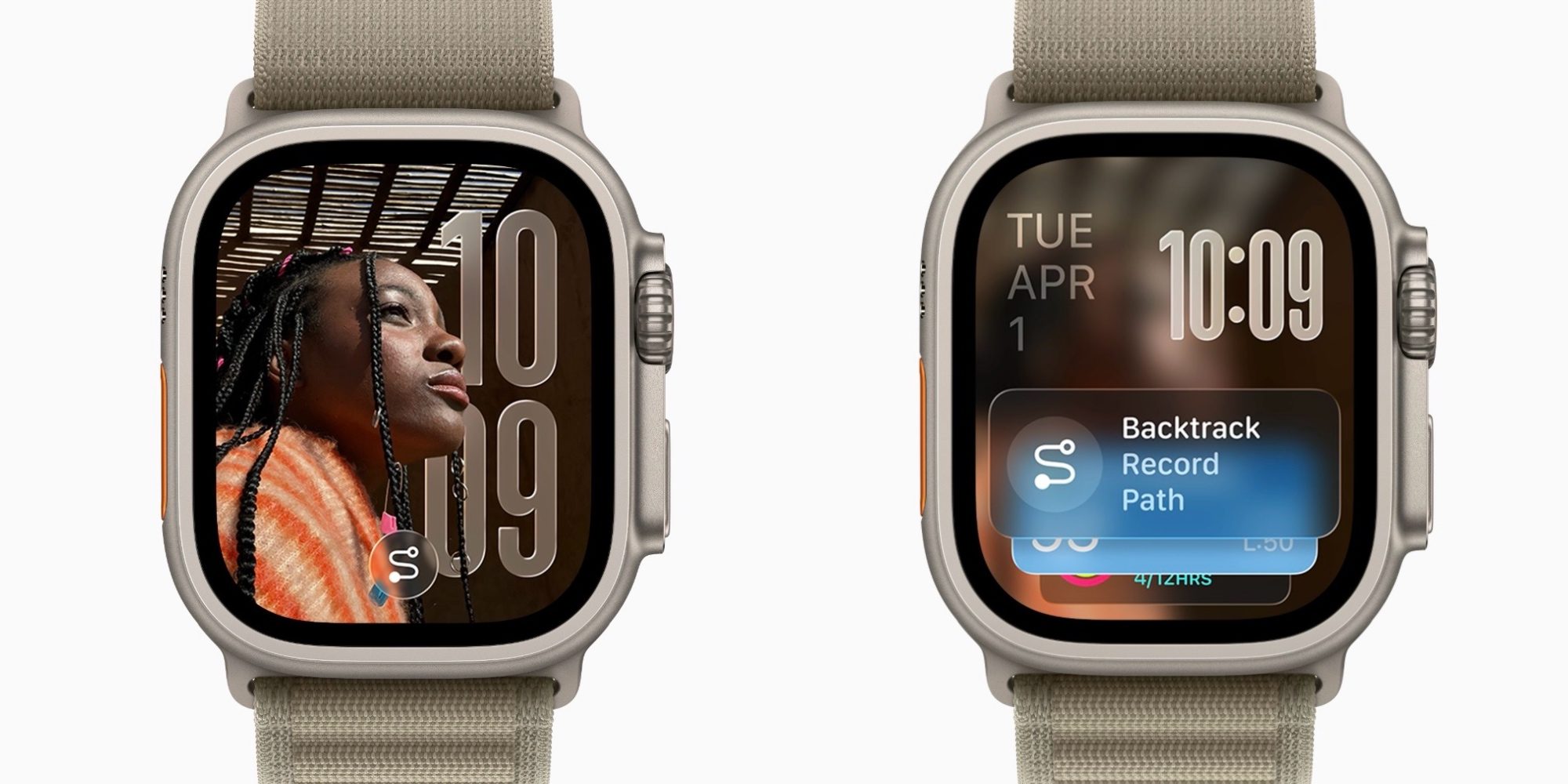
Tapping the hint (seen at the bottom of the left image) will open the Smart Stack with the hinted widget highlighted (right image).
I’m fascinated to see how well hints work in watchOS 26 over time. One concern I have is that they seem like they might get in the way on watch faces that have widgets at the bottom. So far though, I haven’t encountered them often.
If hints work as Apple intends, they could be a fantastic new way to make the Smart Stack more useful. Rather than having to go looking for the Smart Stack’s widgets, the most relevant ones will be brought to you.
How have hints been working for you in watchOS 26? Let us know in the comments.
Best Apple Watch deals and accessories


FTC: We use income earning auto affiliate links. More.

