
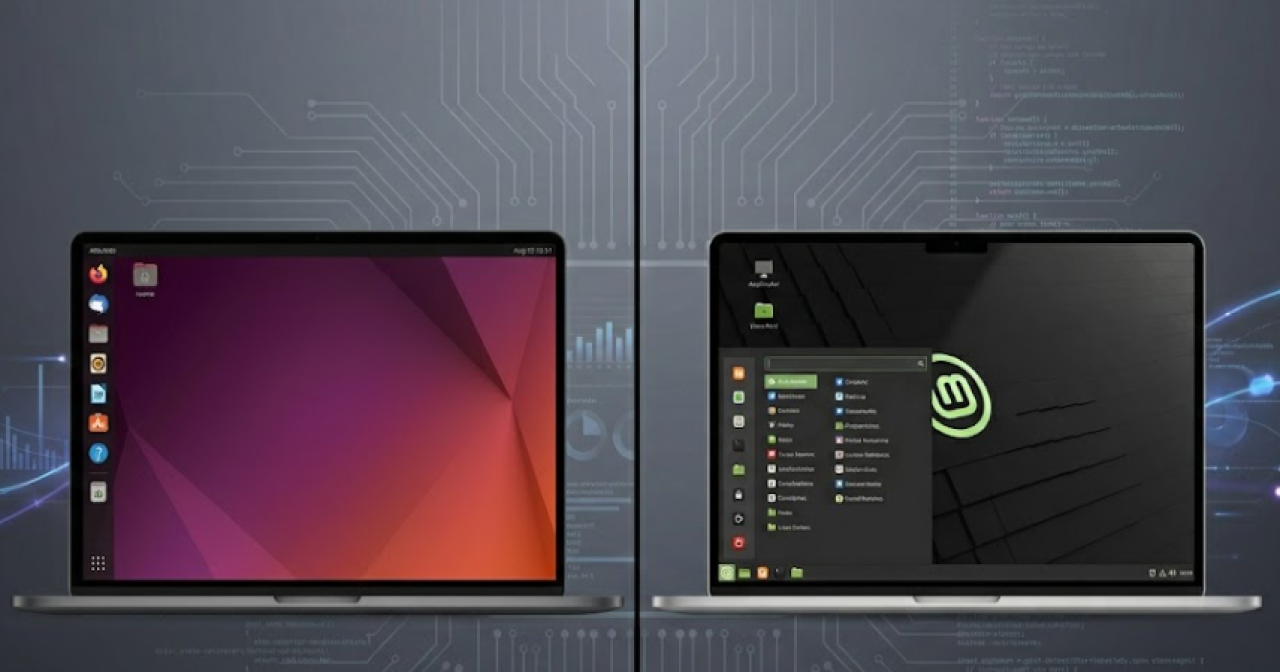
Choosing between Ubuntu and Linux Mint depends primarily on a user’s preference for desktop environments and workflow, as both operating systems share a foundational architecture. While Ubuntu offers a modern interface by default, Linux Mint targets users familiar with traditional Windows-style layouts, according to reporting from The Dhaka Diary.
Technical Foundations and Shared Architecture
At their core, both Ubuntu and Linux Mint operate on the same Debian-based architecture. This shared lineage means that the internal command structures and package management systems—specifically the .deb format—are functionally identical across both platforms. Because of this commonality, technical documentation and installation guides written for Ubuntu are generally compatible with Linux Mint, as detailed by The Dhaka Diary.

The relationship between these two distributions is rooted in the broader structure of the Linux ecosystem. Ubuntu, managed by the commercial entity Canonical Ltd., serves as an upstream source for many other distributions. Linux Mint is built directly atop Ubuntu’s Long Term Support (LTS) releases. This means that when Canonical releases a version of Ubuntu—typically on a biennial schedule for LTS versions—the Linux Mint development team, led by Clement Lefebvre, subsequently integrates these updates into their own distribution. This architecture ensures that Linux Mint users benefit from the rigorous security patching and hardware support cycles established by Canonical, while retaining their unique software selection and desktop environment.
Interface Differences: GNOME vs. Cinnamon
The most significant distinction for the average user lies in the desktop environment. Ubuntu, developed by Canonical, utilizes the GNOME interface. This environment focuses on a minimalist layout, featuring a dedicated application dock and a design aesthetic that draws comparisons to macOS.

In contrast, Linux Mint prioritizes the Cinnamon interface. This environment is specifically engineered to mimic the navigation and visual structure of the Windows operating system, providing a familiar transition point for users migrating from proprietary software. The design philosophy of Cinnamon, which was originally created by the Linux Mint team, emphasizes a traditional panel, a start menu accessible from the bottom-left corner, and a system tray that mimics the taskbar utility found in Microsoft Windows versions dating back several decades. This divergence in philosophy—GNOME’s focus on workspace-centric workflows versus Cinnamon’s focus on task-bar efficiency—represents the primary divide in the Linux desktop market.
Platform Accessibility and User Experience
Beyond desktop environments, users often interact with these systems through mobile and cloud-based ecosystem integrations. Platforms such as YouTube provide native application support across various mobile operating systems to ensure consistent media consumption, as noted in recent store listings on Google Play and the Apple App Store.
These mobile platforms emphasize features like personalized recommendations, subscription management, and, in some regions, premium tiers that allow for ad-free playback and offline viewing. While desktop users debate the merits of Ubuntu’s GNOME versus Linux Mint’s Cinnamon, mobile users face a different set of challenges, such as recent reports of feed loading errors. Some users have noted that, despite attempts to restart or reinstall the application, certain feeds—specifically within the Shorts and video library sections—have failed to load properly. These technical hurdles in mobile application delivery highlight the complexity of maintaining cross-platform parity, a challenge that Linux distributions also face when attempting to maintain software compatibility across varying hardware configurations and kernel versions.
Market Outlook and User Considerations
The choice between Ubuntu and Linux Mint reflects a broader trend in open-source adoption, where user experience design often dictates the success of a distribution. Ubuntu remains a long-standing, established choice for those seeking a modern, polished interface backed by a major corporate entity. Canonical’s business model revolves around providing enterprise-grade support, cloud infrastructure, and IoT solutions, which filters down into the stability of the Ubuntu desktop. Linux Mint continues to serve the community-driven segment, specifically catering to those who prefer the utility of a classic, taskbar-oriented desktop.

The stakes for these distributions are significant in the context of the broader software market. As users seek alternatives to traditional proprietary operating systems, the ease of transition provided by interfaces like Cinnamon can be a decisive factor in adoption rates. Conversely, the high level of enterprise backing for Ubuntu makes it a preferred choice for developers and corporate environments where standardized documentation and long-term support cycles are critical.
As of June 2026, the divergence in these two paths remains a central topic for new Linux users. The decision ultimately rests on whether an individual prioritizes the modern, dock-centric approach of GNOME or the legacy-style navigation found in the Cinnamon desktop environment. Both systems continue to evolve, with development cycles that mirror the rapid pace of open-source innovation, ensuring that users have access to the latest security features and software packages regardless of which interface they choose.
Find more reporting in our Business section.
